Do You Need a Cookie Banner in the UK? 2026 Rules
Not every UK site needs a consent banner, and not every cookie needs consent. What the DUAA changed in February 2026, and how to check your own site.
Most UK websites need a cookie banner, but not every cookie requires consent. Strictly necessary cookies for example, and since February 2026 some first-party analytics, appearance and functionality cookies are exempt too, provided you tell people clearly and give them a simple way to opt out.
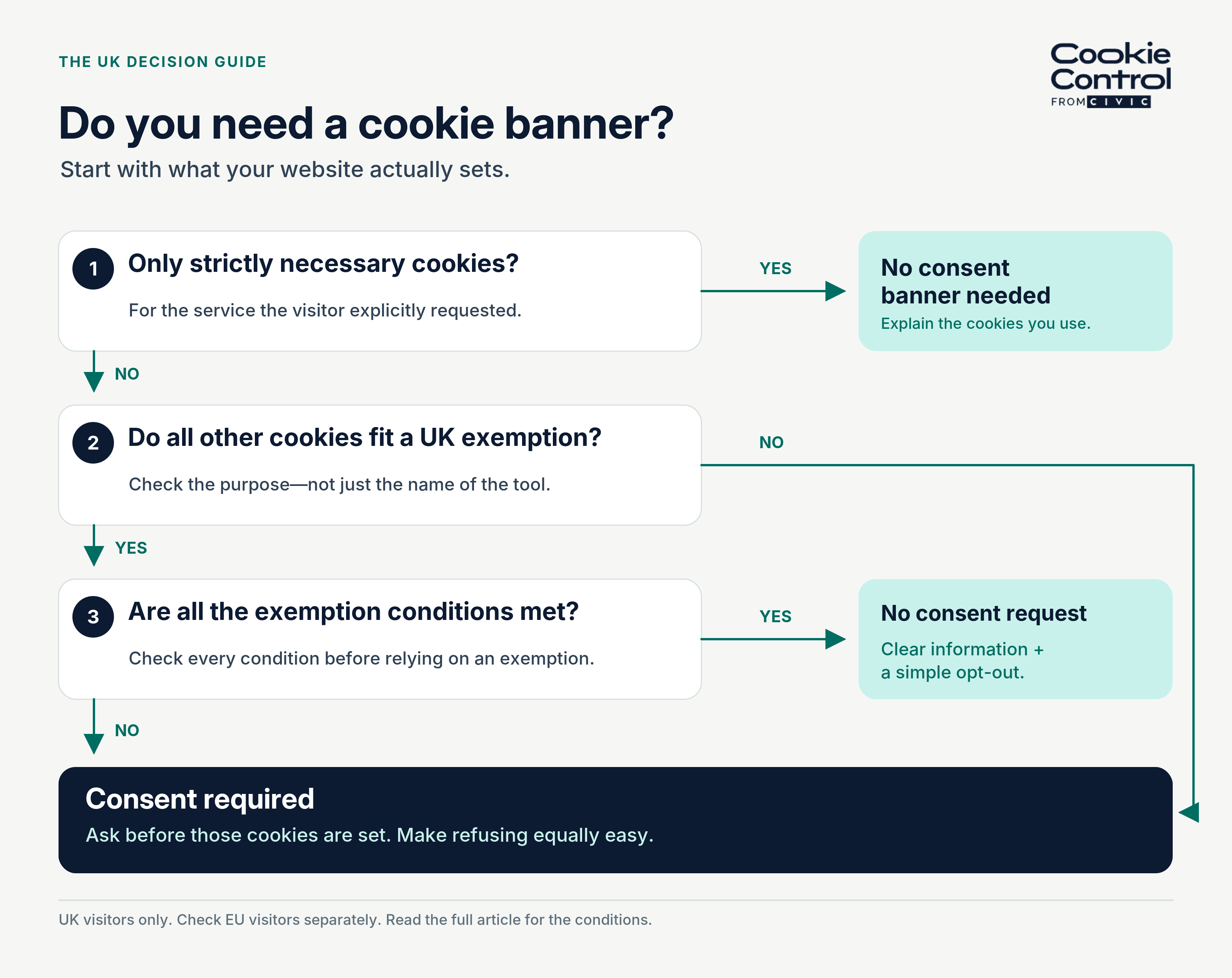
The three questions that decide it. Miss a condition at question three and the exemption never applied.
Whether you need a cookie banner is one of the most common questions we get, and the honest answer changed in February 2026.
This guide covers what UK law requires, what changed in February 2026, and how to work out which category your own site falls into.
What does UK law actually require?
Two pieces of law apply, and confusing them is the source of most bad advice.
The Privacy and Electronic Communications Regulations (PECR) govern the act of storing or reading information on someone’s device.UK GDPR then governs what you do with any personal data that follows, and sets the standard for what counts as valid consent — freely given, specific, informed and unambiguous.
So PECR decides whether you need permission to set the cookie. UK GDPR decides whether the permission you got was any good.
Both were amended by the Data (Use and Access) Act 2025, whose main data provisions commenced on 5 February 2026.
One more thing about PECR that catches people out: it is not only about cookies. Regulation 6 covers storing or reading anything on the device — localStorage, tracking pixels, SDK storage, device fingerprinting. Swapping a cookie for a different mechanism does not change the answer.
Which cookies have never needed consent?
PECR has always exempted cookies that are strictly necessary for a service the user has explicitly requested. In practice that is a narrow list:
- Session cookies that keep someone logged in
- Cookies that remember the contents of a shopping basket
- Load-balancing cookies that keep the site working
- Security cookies that detect repeated failed login attempts
- Cookies that remember someone’s own cookie consent choice
The test is not whether the cookie is useful to you. It is whether the service the visitor asked for would break without it. Analytics has never passed that test on the old rules, which is why analytics has historically needed consent in the UK.
It helps to separate two things that get conflated. A cookie policy is information: a page that explains what you set and why, which every site needs regardless. A cookie banner is a mechanism: the thing that asks permission before non-essential storage happens. You can need the first without the second. You can never satisfy the second with only the first.
What changed on 5 February 2026?
This is the part most sites have not caught up with. The Data (Use and Access) Act added new exemptions to PECR regulation 6. Broadly, they cover:
- First-party statistical purposes — collecting information about how people use your site, to improve it
- Appearance and functionality — remembering preferences such as a chosen language or display setting
- Emergency assistance, where storage is needed to respond to an emergency
These exemptions come with conditions, and the conditions are the whole point. You must give people clear information about the purpose of the storage, and you must offer a simple means of objecting — a free, easy way to opt out. Get the conditions wrong and the exemption does not apply.
It is also a first-party exemption. If your analytics tool shares data with its provider for that provider’s own purposes, you are outside the exemption and back to needing consent. That distinction matters a great deal if you use Google Analytics.
What still needs consent?
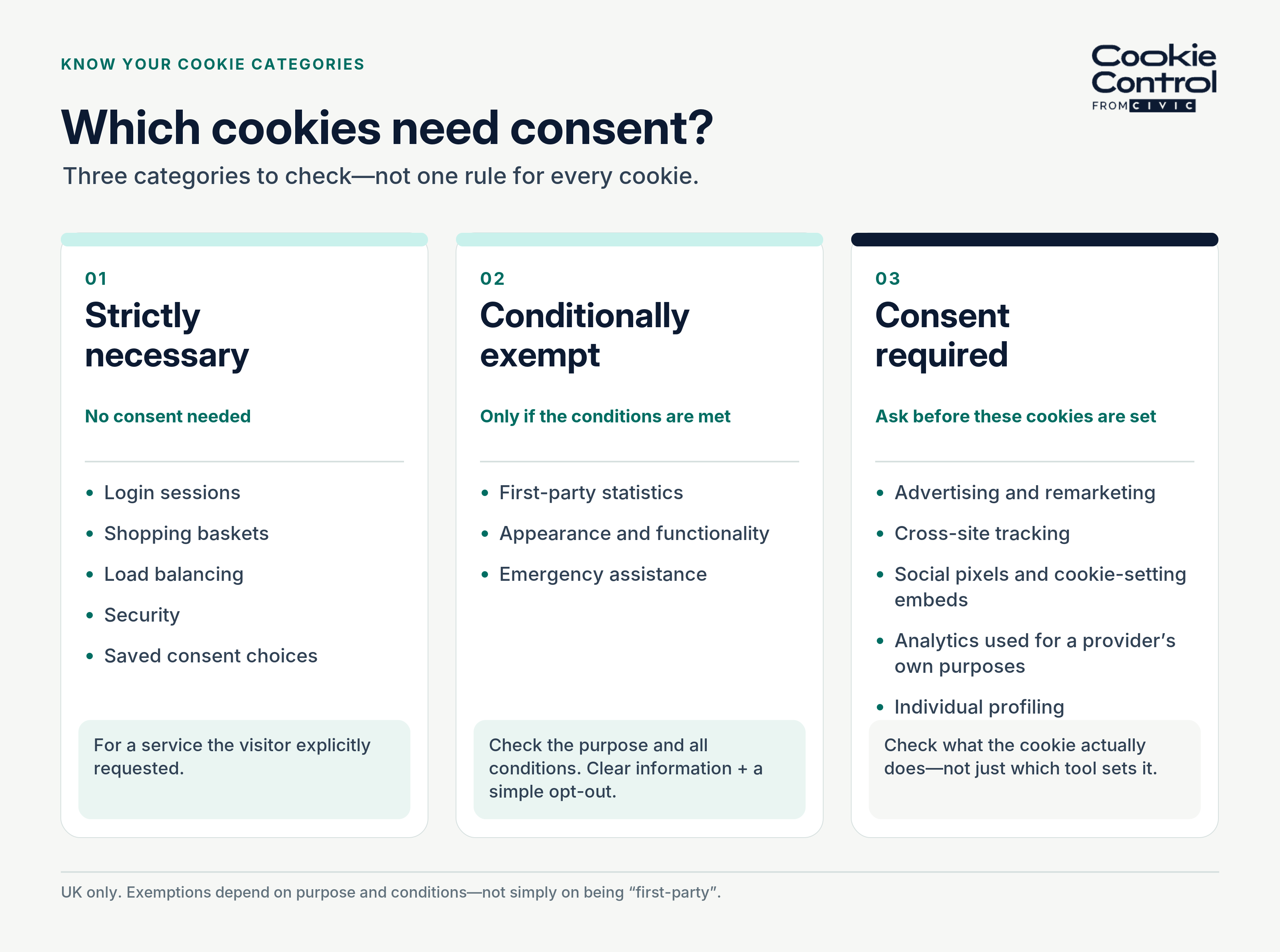
The three categories, side by side. The middle one is conditional — clear information, plus a free and simple way to object.
The list is shorter than it used to be, but it still covers the things most sites care about commercially:
- Advertising and remarketing cookies
- Cookies that track people across different websites
- Social media pixels and embedded content that sets cookies
- Analytics that shares data with a third party for that third party’s purposes
- Anything that builds a profile of an individual
So do you need a banner?
Whether you need a banner or not depends on the following:
- Do you set only strictly necessary cookies? If yes, you do not need a consent banner. You still need to explain the cookies you use, usually in a cookie policy.
- Do you set only strictly necessary cookies plus first-party cookies that fall inside the new exemptions? You may not need a consent request, but you do need clear information and a simple opt-out. Most sites in this position still show a short notice with a link to preferences.
- Do you set anything for advertising, cross-site tracking, or third-party purposes? You need consent before those cookies are set, with an equally easy way to refuse.
- Do you serve visitors in the EU as well? EU rules have not changed in the same way. If you rely on the UK exemptions for UK visitors, you will need different behaviour for EU visitors, which is what geolocation settings are for. Cookie Control can vary the banner by location for exactly this reason, and Premium automatically upgrades to a stricter mode where a visitor’s location requires it, even if a looser mode is your default.
Most commercial sites land on option three. Most brochure sites for small organisations land on option one or two and are running a banner they may no longer need in its current form.
If you do need a banner, what does it have to do?
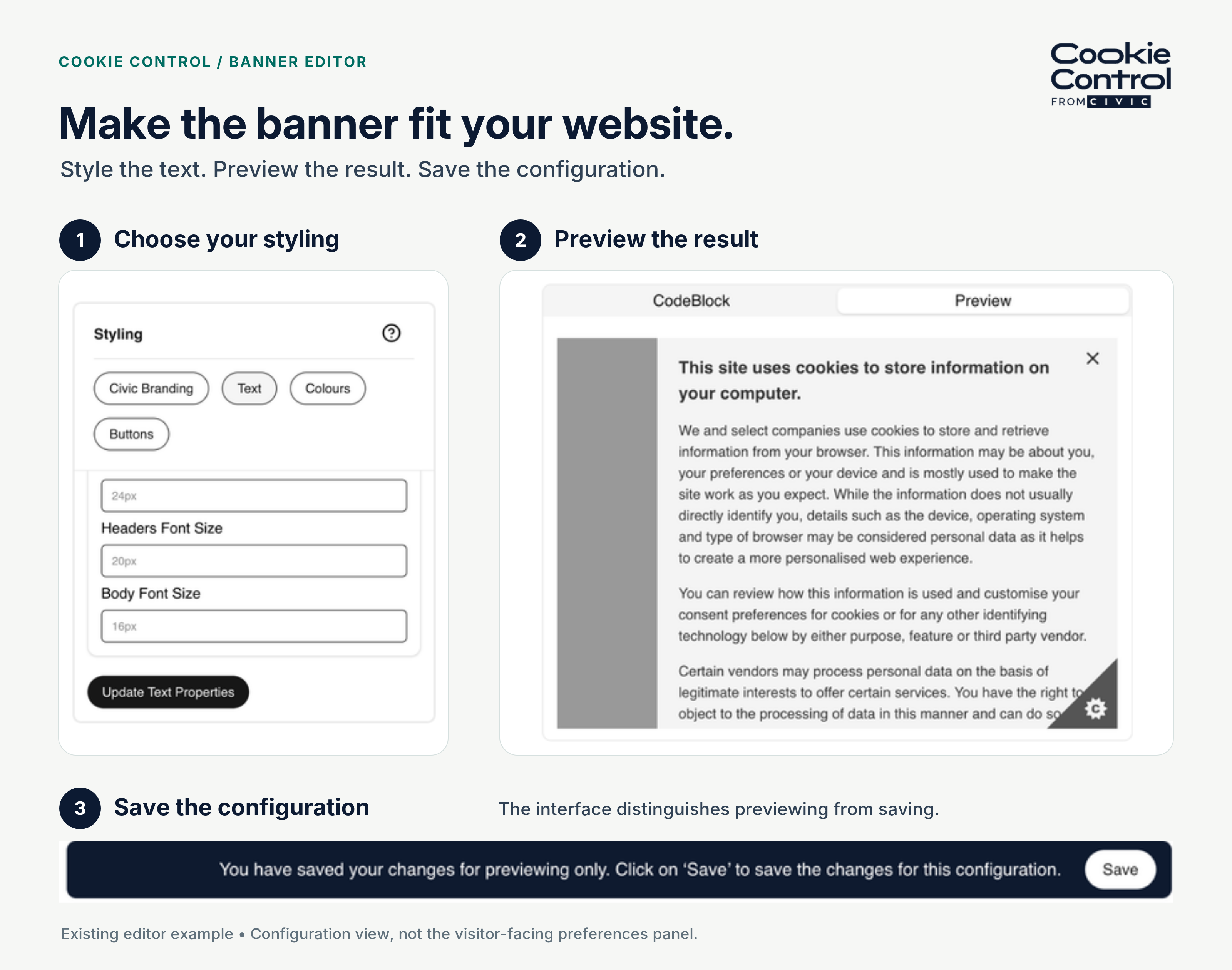
A Cookie Control banner editor example — choose the styling, preview the result and save the configuration.
The standard comes from the UK GDPR definition of consent, and in practice it means five things.
- Ask before anything non-essential is stored — not after the page has already set it.
- Offer reject as prominently as accept. A large “Accept all” next to a small “Manage settings” link is the pattern regulators have singled out most often.
- Leave optional categories off until the visitor turns them on. No pre-ticked boxes.
- Let people change their mind as easily as they consented — a persistent way back to the preferences panel.
- Remember the choice, and be able to prove it. Cookie Control stores the decision in a first-party cookie for 90 days by default, so returning visitors are not asked every time, and its consent log records six data points per decision: an anonymous browser identifier, the categories chosen, the date and time, an anonymised IP address, the user agent and the page it happened on.
Our plain-English guide to UK GDPR and PECR goes through each of these in more depth.
A two-minute self-check
Six questions. Each “yes” tells you which bucket you are in before you have run anything.
- Do you use Google Analytics or another analytics tool? Then you are in the exemption conversation — first-party, for your own improvement, with disclosure and an opt-out — or in consent territory if the tool uses the data for its own purposes.
- Do you embed video, maps or social content? Standard embeds set third-party cookies before anyone interacts. Consent, or a click-to-load placeholder.
- Do you run a social media pixel or any remarketing? Consent, no exceptions.
- Do you have a chat widget, review carousel or booking tool from a third party? Check what it sets — most set something — and gate it.
- Do you serve visitors in the EU? Then you need a second posture; the UK exemptions do not travel. Our 2027 guide covers running both.
- Do you know what your site sets today? If the answer is no, the scan comes before every other decision.
Two or more “yes” answers and you need a banner. One “yes” on question one alone and you may not — but you need the documentation that says why. The first-party versus third-party distinction behind questions two to four has its own explainer.
What happens if you get it wrong?
The stakes changed on the same date as the exemptions. The maximum fine under PECR rose from £500,000 to the UK GDPR level: up to £17.5 million or 4% of annual global turnover, whichever is higher.
That is a maximum, not a going rate. Enforcement in this area has more often taken the form of the ICO writing to organisations and asking them to fix their banners, and most do. But the ceiling is now high enough that cookie consent has moved from a marketing problem to a board-level one.
How do you check your own site?
You cannot answer any of the above without knowing what your site actually sets, and almost every site sets more than its owner thinks. Tag managers, embedded videos, chat widgets and marketing tools all add cookies that nobody deliberately chose.
Run a scan of your site, list what comes back, and sort each item into: strictly necessary, exempt first-party, or needs consent. That list is the foundation for everything else — your banner categories, your cookie policy, and your answer to this question.
A few things worth knowing about scanning. Our scanner behaves as it would for a visitor inside the EU. It scans public pages only — anything behind a login is a blind spot you will need to check by hand. It can scan behind the banner, impersonating a visitor who accepted every category, so you see the full cookie surface rather than the pre-consent one. And no scanner can promise to find every cookie, which is why an occasional look in your browser’s developer tools is still worth the five minutes.
The list also goes stale. A new chat widget, an embedded video, a tag someone added in the tag manager — each one changes what your site sets. Scheduled scans are how you catch that after launch: they run on a repeat you choose, for a year at a time, and you are notified when something new turns up.
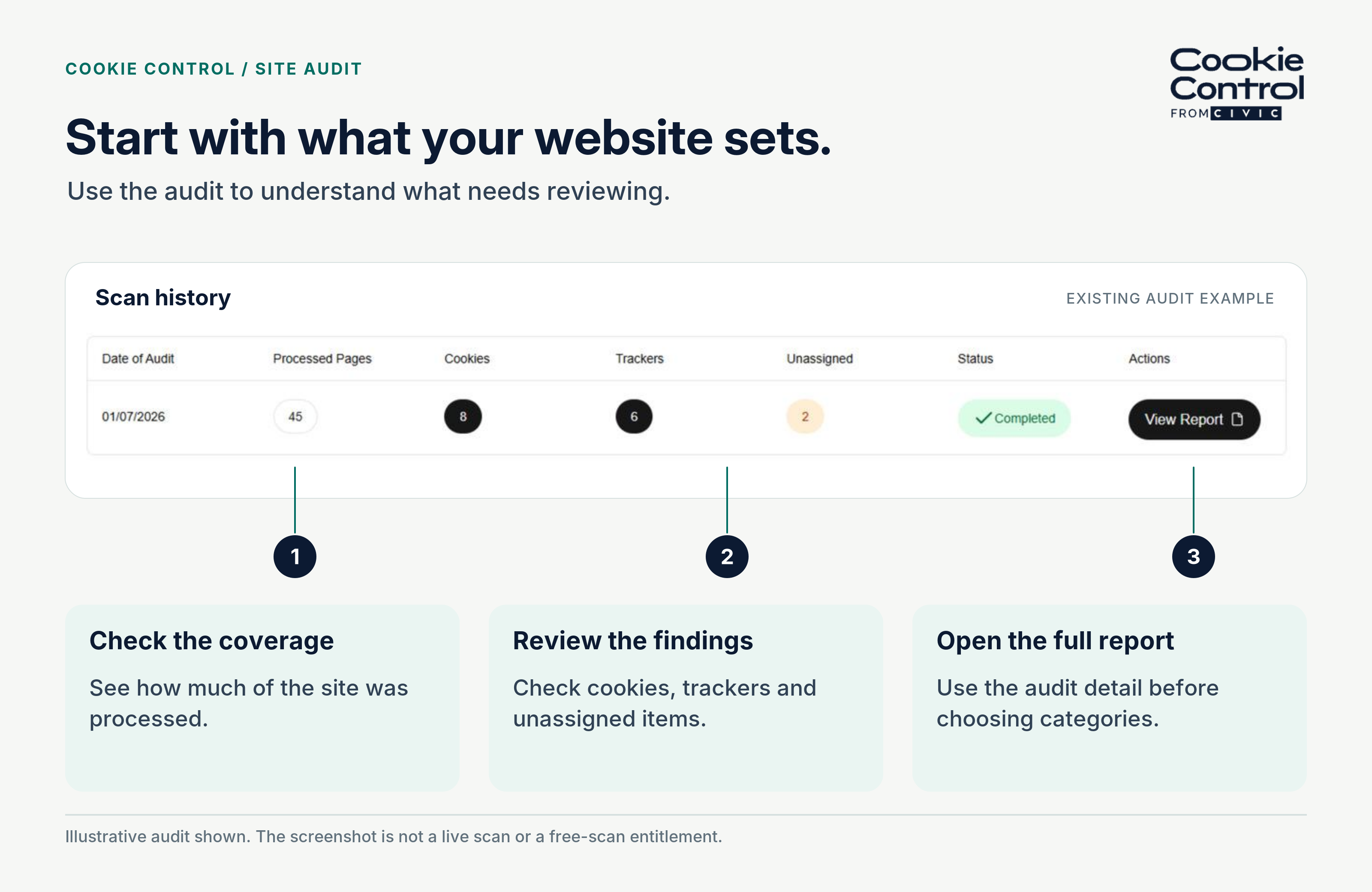
A completed site audit in Cookie Control: pages processed, cookies and trackers found, and anything still unassigned.
Frequently asked questions
Sources
- Privacy and Electronic Communications Regulations 2003, regulation 6 (as amended)
- Data (Use and Access) Act 2025 — main data provisions commenced 5 February 2026
- ICO guidance on the use of storage and access technologies (April 2026)
- Cookie Control — Changes in 2025 to UK GDPR and the Data (Use and Access) Act 2025